Your digital displays, finally on autopilot
Run a scrolling ticker, mark something sold out, update a price — just say it, and every screen keeps itself current. No playlists to build, no software to learn.
Use the menu photos and designs you already have — no templates to redesign around.
Camden Kitchen
Today’s featured menu

Double patty, cheddar, house sauce

Buttermilk fried, slaw, pickles

Slow-simmered pork & beef ragù

Parmesan & fresh herbs
Assistant
Online
How AirBoard works
Turn any screen into a smart display in three steps.
Pair your screens
Install AirBoard on any Android TV, Fire TV Stick, or open it in a browser tab. Pair it with a code in seconds — no extra hardware.
Tell the assistant
Upload your media, then say what you want changed in plain English. One chat is the one write path behind every screen.
It keeps running itself
Overlays expire on their own schedule, Square stays in sync, and anything that needs a second look waits in your approvals inbox.
Everything you need to run your screens
Chat does the work
Say what to change in plain English. The assistant is the one write path behind every update — no hunting through menus.
No playlists to manage
Schedule any photo, video, or menu board straight onto a screen, with exact start and end times.
Auto-expiring overlays
Flag an item "sold out" for three hours and it lifts itself — no regenerating artwork, no forgetting to undo it.
Region-scoped AI edits
Draw a box and only that patch repaints. The rest of the image never moves.
Square sync, human in the loop
Price changes flow from your POS into an approval, not straight to the screen.
Approvals inbox
Review every AI suggestion before it airs, or mark trusted categories to auto-approve.
Runs on hardware you own
Android TV, Fire TV Stick, or any browser tab. No proprietary player required.
One timeline, every screen
See what’s playing where and when across your whole fleet, and drag to adjust.
Your menu, live on any screen
Crisp, on-brand, and updated the moment you change something — no reboot, no reprint.
Camden Kitchen
Today’s featured menu
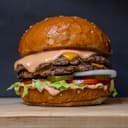
Double patty, cheddar, house sauce
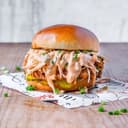
Buttermilk fried, slaw, pickles
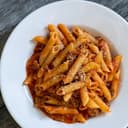
Slow-simmered pork & beef ragù
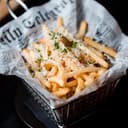
Parmesan & fresh herbs
to update every screen
ways to run it — Android TV, Fire TV & browser
extra hardware — use the screens you already own
Works with the tools and screens you already use